【OpenCode系统性指南】第6篇:自定义命令:一键执行复杂任务
【OpenCode系统性指南】第6篇:自定义命令:一键执行复杂任务
引言
你是否厌倦了每天重复输入相同的命令序列?Git 提交时要先 status、再 diff、再 add、再 commit;代码审查时要先切换分支、再拉取更新、再运行测试、再查看差异……这些重复性操作不仅浪费时间,还容易出错。
OpenCode 的自定义命令功能就是为了解决这个问题而生的。通过一个简单的 .md 文件,你可以将任意复杂的多步骤工作流封装成一个斜杠命令,让 AI 自动完成所有繁琐步骤。本文将带你深入理解自定义命令的工作原理,并分享 5 个实用的命令模板。
一、什么是自定义命令
自定义命令(Custom Commands)是 OpenCode 提供的一种工作流封装机制。它允许你将一系列操作步骤、上下文信息和权限规则打包成一个 Markdown 文件,通过 /命令名 的方式一键触发。
1.1 核心价值
自定义命令解决的是「重复性复杂任务」的问题:
| 痛点 | 传统方式 | 自定义命令 |
|---|---|---|
| Git 提交 | 手动执行 4-5 条命令 | /commit 一键完成 |
| 代码审查 | 切换分支、拉代码、看 diff、写 | /review 自动分析 |
| 部署流程 | 构建、测试、推送、通知 | /deploy 全自动 |
| 文档生成 | 阅读代码、提取注释、格式化输出 | /docs 一键生成 |
1.2 工作原理
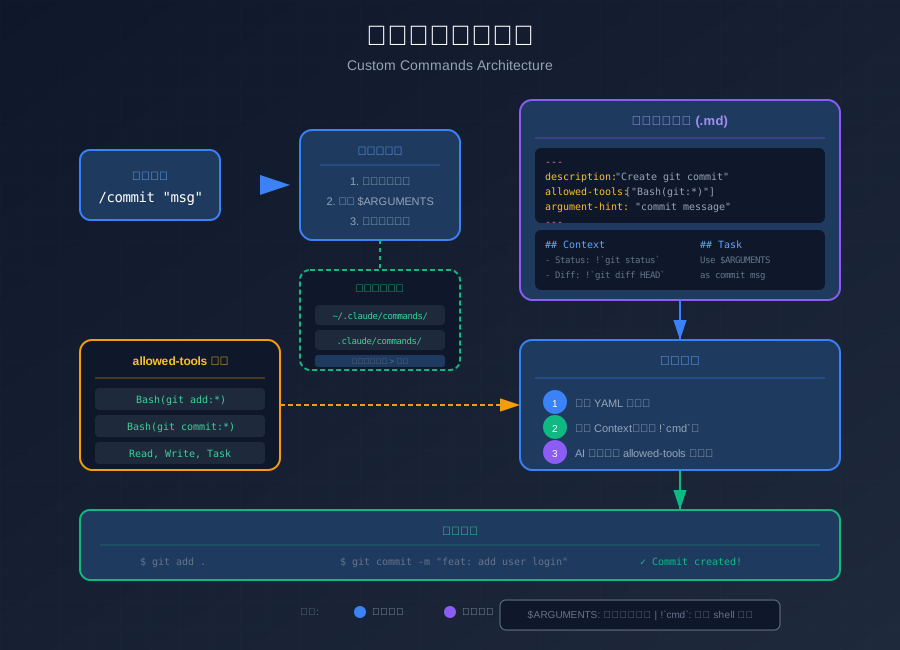
当你输入 /commit "添加登录功能" 时,OpenCode 会执行以下流程:
- 命令解析:识别命令名为
commit,参数为"添加登录功能" - 文件定位:在命令目录中查找
commit.md文件 - 上下文注入:执行文件中的 Shell 命令(如
!git status``),将结果注入上下文 - AI 执行:将完整提示词发送给 AI,AI 在
allowed-tools约束下执行任务
二、命令文件的位置与结构
2.1 三种命令位置
OpenCode 支持三种命令存放位置,形成灵活的层级体系:
| 位置 | 路径 | 用途 | 优先级 |
|---|---|---|---|
| 用户命令 | ~/.claude/commands/ | 个人全局命令,所有项目可用 | 低 |
| 项目命令 | .claude/commands/ | 项目特定命令,可通过 Git 共享给团队 | 高 |
| 插件命令 | plugin-name/commands/ | 可分发的插件包,需安装后使用 | 中 |
优先级规则:当同名命令同时存在于多个位置时,项目命令 > 插件命令 > 用户命令。
2.2 创建你的第一个命令
让我们创建一个简单的 /hello 命令:
# 创建命令目录
mkdir -p ~/.claude/commands

# 创建命令文件
cat > ~/.claude/commands/hello.md << 'EOF'
---
description: Say hello to the user
---

Greet the user warmly and ask what they would like to work on today.
EOF
现在在 OpenCode 中输入 /hello,AI 就会友好地问候你。
2.3 命令文件结构详解
一个完整的命令文件包含两部分:YAML 元数据 和 Markdown 正文。
---
description: Create a git commit          # 命令描述(显示在命令列表中)
argument-hint: "commit message"           # 参数提示(可选)
allowed-tools: ["Bash(git add:*)", "Bash(git commit:*)", "Read"]  # 工具权限
---

## Context

- Current git status: !`git status --short`
- Changes to be committed: !`git diff HEAD --stat`
- Recent commits: !`git log --oneline -5`

## Your Task

Based on the changes shown above, create a git commit with a descriptive message.
Use $ARGUMENTS as additional context if provided.
关键语法说明:
---之间的内容是 YAML 元数据(frontmatter)!command`` 执行 Shell 命令并将结果注入上下文$ARGUMENTS接收用户输入的参数
三、参数化命令:$ARGUMENTS 用法
3.1 基本用法
$ARGUMENTS 是一个特殊的占位符,用于接收用户在命令后输入的参数。
/commit 添加用户登录功能
在这个例子中,$ARGUMENTS 的值就是 添加用户登录功能。
3.2 在命令中使用
---
description: Search codebase for a pattern
argument-hint: "search pattern"
allowed-tools: ["Grep", "Read"]
---

## Context

- Current directory: !`pwd`
- File types: !`find . -type f -name "*.ts" -o -name "*.js" | head -20`

## Your Task

Search the codebase for: **$ARGUMENTS**

1. Use Grep to find all occurrences
2. Show the most relevant results with context
3. Summarize what you found
3.3 参数处理技巧
当参数可能包含特殊字符或为空时,可以这样处理:
## Your Task

Search for the following pattern:
{{if $ARGUMENTS}}
$ARGUMENTS
{{else}}
[No search pattern provided - please ask the user]
{{endif}}
四、5 个常用命令模板
下面是我日常开发中高频使用的 5 个命令模板,你可以直接复制使用。
4.1 Git 提交命令
文件:.claude/commands/commit.md
---
description: Create a git commit with auto-generated message
allowed-tools:
  - Bash(git status:*)
  - Bash(git diff:*)
  - Bash(git log:*)
  - Bash(git add:*)
  - Bash(git commit:*)
  - Read
---

## Context

- **Current branch**: !`git branch --show-current`
- **Git status**: !`git status`
- **Staged changes**: !`git diff --cached --stat`
- **Unstaged changes**: !`git diff --stat`
- **Recent commits**: !`git log --oneline -5`

## Git Safety Protocol

- NEVER update the git config
- NEVER run destructive git commands (push --force, reset --hard, clean -f)
- NEVER skip hooks (--no-verify)
- ALWAYS create NEW commits, never amend existing ones

## Your Task

1. Analyze the changes shown above
2. Stage relevant files with `git add`
3. Create a commit with a descriptive message following conventional commits format:
   - `feat:` for new features
   - `fix:` for bug fixes
   - `docs:` for documentation
   - `refactor:` for code refactoring
   - `test:` for test changes

{{if $ARGUMENTS}}
Additional context from user: $ARGUMENTS
{{endif}}
4.2 测试运行命令
文件:.claude/commands/test.md
---
description: Run project tests with auto-detection
allowed-tools:
  - Bash(npm test:*)
  - Bash(npm run test:*)
  - Bash(pnpm test:*)
  - Bash(yarn test:*)
  - Bash(pytest:*)
  - Bash(go test:*)
  - Read
  - Glob
---

## Context

- **Package manager**: !`[ -f "pnpm-lock.yaml" ] && echo "pnpm" || ([ -f "yarn.lock" ] && echo "yarn" || echo "npm")`
- **Test script**: !`cat package.json 2>/dev/null | grep -A5 '"scripts"' | grep test || echo "not found"`
- **Python project**: !`[ -f "pytest.ini" ] && echo "pytest detected" || ([ -f "setup.py" ] && echo "python project" || echo "not python")`
- **Go project**: !`[ -f "go.mod" ] && echo "go module detected" || echo "not go"`

## Your Task

1. Detect the project type and testing framework
2. Run the appropriate test command
3. Report any failures with suggestions for fixing

{{if $ARGUMENTS}}
Test filter: $ARGUMENTS
{{endif}}
4.3 代码审查命令
文件:.claude/commands/review.md
---
description: Review code changes for issues and improvements
allowed-tools:
  - Bash(git diff:*)
  - Bash(git log:*)
  - Bash(git branch:*)
  - Read
  - Grep
  - Glob
---

## Context

- **Current branch**: !`git branch --show-current`
- **Base branch**: !`git remote show origin 2>/dev/null | grep "HEAD branch" | cut -d":" -f2 | tr -d ' ' || echo "main"`
- **Changes**: !`git diff origin/main...HEAD --stat 2>/dev/null || git diff HEAD~1 --stat`
- **Recent commits on this branch**: !`git log --oneline -10`

## Review Checklist

Please review the changes for:

1. **Correctness**: Logic errors, edge cases, potential bugs
2. **Security**: Input validation, authentication, data exposure
3. **Performance**: N+1 queries, memory leaks, unnecessary computations
4. **Maintainability**: Code clarity, naming conventions, documentation
5. **Testing**: Test coverage, test quality

## Your Task

1. Read all changed files
2. Provide a structured review with:
   - Critical issues (must fix)
   - Suggestions (should consider)
   - Positive observations
3. Be constructive and specific

{{if $ARGUMENTS}}
Focus area: $ARGUMENTS
{{endif}}
4.4 文档生成命令
文件:.claude/commands/docs.md
---
description: Generate documentation for code
argument-hint: "file or directory path"
allowed-tools:
  - Read
  - Write
  - Glob
  - Grep
---

## Context

- **Target**: {{if $ARGUMENTS}}$ARGUMENTS{{else}}current directory{{endif}}
- **Files**: !`find {{if $ARGUMENTS}}$ARGUMENTS{{else}}.{{endif}} -type f \( -name "*.ts" -o -name "*.js" -o -name "*.py" -o -name "*.go" \) 2>/dev/null | head -20`

## Documentation Standards

- Use JSDoc/TSDoc for TypeScript/JavaScript
- Use docstrings for Python
- Include examples where helpful
- Document parameters, return values, and exceptions

## Your Task

1. Read the target files
2. Generate comprehensive documentation
3. Create or update a README.md with:
   - Module overview
   - API reference
   - Usage examples

Target path: {{if $ARGUMENTS}}$ARGUMENTS{{else}}ask user{{endif}}
4.5 部署命令
文件:.claude/commands/deploy.md
---
description: Deploy the application
allowed-tools:
  - Bash(npm run:*)
  - Bash(pnpm run:*)
  - Bash(docker:*)
  - Bash(git push:*)
  - Read
  - Glob
---

## Context

- **Current branch**: !`git branch --show-current`
- **Uncommitted changes**: !`git status --short`
- **Deploy scripts**: !`cat package.json 2>/dev/null | grep -E '"(deploy|build)"' || echo "none"`
- **Docker**: !`[ -f "Dockerfile" ] && echo "Dockerfile found" || echo "no Dockerfile"`

## Safety Checks

Before deploying, verify:
- [ ] All tests pass
- [ ] No uncommitted changes (or intentional)
- [ ] Correct branch (usually main/master)

## Your Task

1. Run pre-deployment checks
2. Build the application
3. Execute deployment
4. Verify deployment success

{{if $ARGUMENTS}}
Environment: $ARGUMENTS
{{else}}
Ask user which environment to deploy to (staging/production)
{{endif}}
五、命令开发最佳实践
5.1 权限最小化原则
只授予命令执行所需的最小权限:
# 好的做法:只允许特定的 git 操作
allowed-tools: ["Bash(git status:*)", "Bash(git diff:*)", "Bash(git commit:*)"]

# 不好的做法:给予过大的权限
allowed-tools: ["Bash"]  # 危险!可以执行任何命令
5.2 上下文要充分
提供足够的上下文信息,让 AI 能做出正确判断:
## Context

- **Current branch**: !`git branch --show-current`
- **Recent commits**: !`git log --oneline -5`
- **Changed files**: !`git diff --name-only`
- **Package versions**: !`cat package.json | grep -A2 '"version"'`
5.3 错误处理
在命令中加入错误处理指引:
## Error Handling

If something goes wrong:
1. Explain the error clearly
2. Suggest possible fixes
3. Do NOT proceed with destructive operations
4. Ask the user for guidance if uncertain
5.4 团队协作
将项目命令提交到 Git 仓库,让团队成员共享:
# 将命令加入版本控制
git add .claude/commands/
git commit -m "feat: add custom commands for team workflow"
小结
- 核心概念:自定义命令将复杂工作流封装为斜杠命令,通过
.md文件定义 - 文件位置:用户命令(全局)、项目命令(可共享)、插件命令(可分发)三层体系
- 参数机制:
$ARGUMENTS接收用户输入,!cmd`` 执行 Shell 命令注入上下文 - 权限控制:
allowed-tools限制 AI 可用的工具,遵循最小权限原则 - 实践模板:Git 提交、测试运行、代码审查、文档生成、部署五大常用命令