【OpenCode系统性指南】第9篇:MCP进阶:构建你的第一个MCP服务器
【OpenCode系统性指南】第9篇:MCP进阶:构建你的第一个MCP服务器
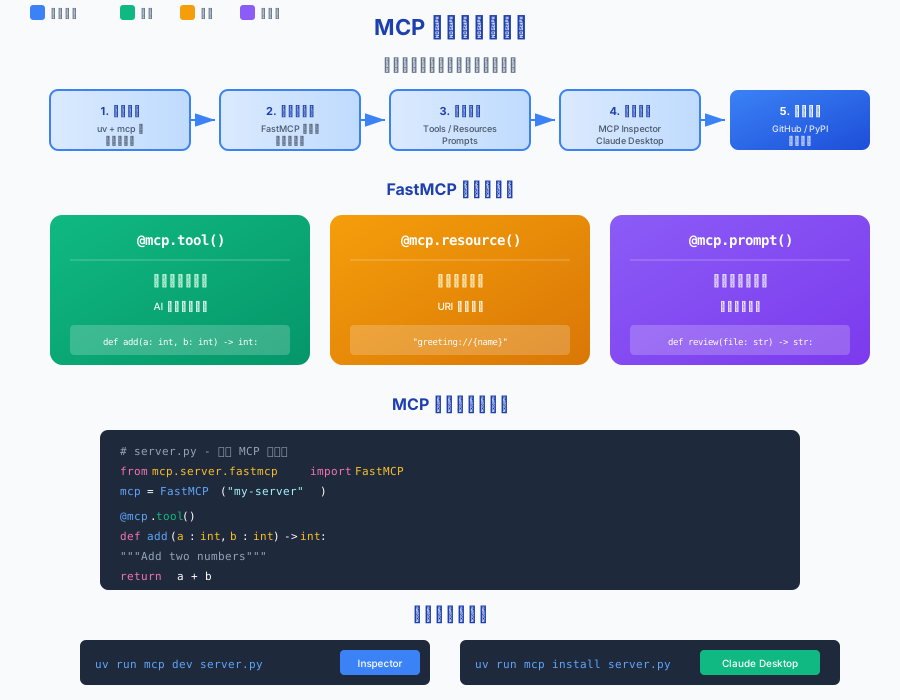
引言
在上一篇文章中,我们了解了 MCP 协议的基本概念,学会了如何配置现成的 MCP 服务器。但如果现有的服务器无法满足你的需求呢?比如你想让 AI 访问公司内部的 API、连接特定的数据库,或者实现一个独特的工作流——这时就需要自己动手开发 MCP 服务器了。
好消息是,借助 Python SDK 提供的 FastMCP 框架,创建一个功能完整的 MCP 服务器只需要几十行代码。本文将带你从零开始,系统性地掌握 MCP 服务器开发的完整流程:环境搭建、工具定义、资源暴露、提示词模板,以及测试和发布。
一、开发环境搭建
1.1 为什么选择 Python
MCP 官方提供了两种 SDK:Python SDK 和 TypeScript SDK。对于大多数开发者来说,Python 是更好的入门选择:
| 特性 | Python SDK | TypeScript SDK |
|---|---|---|
| 学习曲线 | 平缓 | 需要了解 Node.js 生态 |
| FastMCP | 原生支持,装饰器 API | 需要使用 Zod 进行验证 |
| 代码量 | 更少 | 相对较多 |
| 社区示例 | 丰富 | 丰富 |
本系列文章将以 Python SDK 为主进行讲解。
1.2 安装 uv 包管理器
uv 是 Astral 公司开发的现代 Python 包管理器,比传统的 pip 快 10-100 倍。MCP 官方推荐使用 uv 来管理项目依赖。
macOS / Linux:
curl -LsSf https://astral.sh/uv/install.sh | sh
Windows:
powershell -ExecutionPolicy ByPass -c "irm https://astral.sh/uv/install.ps1 | iex"
验证安装:
uv --version
1.3 创建项目结构
使用 uv 快速初始化项目:
# 创建项目目录
uv init my-mcp-server
cd my-mcp-server

# 添加 MCP 依赖(包含 CLI 工具)
uv add "mcp[cli]"
完成后,项目结构如下:
my-mcp-server/
├── .python-version
├── pyproject.toml
├── README.md
└── hello.py
将 hello.py 重命名为 server.py,我们将在其中编写 MCP 服务器代码。
二、FastMCP 快速入门
2.1 什么是 FastMCP
FastMCP 是 Python SDK 提供的高级 API,它借鉴了 FastAPI 的设计理念,通过装饰器让 MCP 服务器的开发变得极其简洁。
FastMCP 的核心优势:
- 装饰器驱动:用
@mcp.tool()、@mcp.resource()、@mcp.prompt()一键注册能力 - 自动类型推断:基于 Python 类型注解自动生成 JSON Schema
- 零配置启动:内置多种传输协议,一行代码即可运行
- 开发体验友好:支持热重载、自动文档生成
2.2 最简服务器
创建一个最简单的 MCP 服务器只需要 5 行代码:
from mcp.server.fastmcp import FastMCP

# 初始化服务器
mcp = FastMCP("my-server")

# 运行服务器
if __name__ == "__main__":
    mcp.run()
这个服务器虽然没有任何功能,但已经是一个合法的 MCP 服务器了。让我们运行它:
uv run server.py
默认情况下,服务器使用 stdio 传输模式,等待从标准输入接收 MCP 消息。
2.3 FastMCP vs 低级 Server API
Python SDK 提供了两套 API:
| 特性 | FastMCP | 低级 Server API |
|---|---|---|
| 代码量 | 少 | 多 |
| 学习曲线 | 平缓 | 陡峭 |
| 灵活性 | 中等 | 完全控制 |
| 适用场景 | 95% 的需求 | 特殊定制需求 |
对于绝大多数场景,FastMCP 都是最佳选择。只有当你需要完全控制协议层的每个细节时,才需要使用低级 API。
三、定义你的第一个工具
3.1 @mcp.tool() 装饰器
Tool 是 MCP 服务器最核心的能力,它让 AI 模型可以执行操作。使用 @mcp.tool() 装饰器即可将普通 Python 函数变成 MCP 工具:
from mcp.server.fastmcp import FastMCP

mcp = FastMCP("calculator")

@mcp.tool()
def add(a: int, b: int) -> int:
    """Add two numbers together.

    Args:
        a: First number
        b: Second number

    Returns:
        The sum of a and b
    """
    return a + b

@mcp.tool()
def multiply(a: int, b: int) -> int:
    """Multiply two numbers.

    Args:
        a: First number
        b: Second number

    Returns:
        The product of a and b
    """
    return a * b
关键点:
- 函数名就是工具名(
add、multiply) - docstring 会被解析为工具描述
- 类型注解自动生成参数的 JSON Schema
- 返回值类型决定输出的格式
3.2 参数类型和验证
FastMCP 支持丰富的参数类型:
from typing import Literal, Optional
from pydantic import BaseModel, Field

# 基本类型
@mcp.tool()
def greet(name: str, count: int = 1) -> str:
    """Greet someone multiple times."""
    return f"Hello, {name}! " * count

# 枚举类型
@mcp.tool()
def set_color(color: Literal["red", "green", "blue"]) -> str:
    """Set the display color."""
    return f"Color set to {color}"

# 可选参数
@mcp.tool()
def search(query: str, limit: Optional[int] = None) -> str:
    """Search for items."""
    return f"Searching for '{query}' with limit {limit}"

# 使用 Pydantic 进行复杂验证
class UserInfo(BaseModel):
    name: str = Field(description="User's full name")
    age: int = Field(ge=0, le=150, description="User's age")
    email: str = Field(pattern=r"^[\w\.-]+@[\w\.-]+\.\w+$")

@mcp.tool()
def create_user(user: UserInfo) -> str:
    """Create a new user account."""
    return f"Created user: {user.name} ({user.email})"
3.3 结构化输出
当工具需要返回结构化数据时,可以使用 Pydantic 模型:
from pydantic import BaseModel
from typing import List

class SearchResult(BaseModel):
    title: str
    url: str
    score: float

class SearchResponse(BaseModel):
    query: str
    results: List[SearchResult]
    total: int

@mcp.tool()
def web_search(query: str) -> SearchResponse:
    """Search the web and return structured results."""
    # 模拟搜索结果
    return SearchResponse(
        query=query,
        results=[
            SearchResult(title="Result 1", url="https://example.com/1", score=0.95),
            SearchResult(title="Result 2", url="https://example.com/2", score=0.87),
        ],
        total=2
    )
FastMCP 会自动生成输出 Schema,让客户端知道返回值的结构。
四、添加资源和提示词
4.1 @mcp.resource() 资源定义
Resource 是只读的数据源,通过 URI 暴露给客户端。FastMCP 支持静态资源和动态资源模板:
# 静态资源 - 固定 URI
@mcp.resource("config://app")
def get_app_config() -> str:
    """Get application configuration."""
    return """
    {
        "version": "1.0.0",
        "debug": false,
        "max_connections": 100
    }
    """

# 动态资源模板 - URI 中包含参数
@mcp.resource("users://{user_id}/profile")
def get_user_profile(user_id: str) -> str:
    """Get a user's profile by ID."""
    # 在实际应用中,这里会查询数据库
    return f"""
    {{
        "user_id": "{user_id}",
        "name": "John Doe",
        "email": "john@example.com"
    }}
    """

# 返回字节内容(如图片、文件)
@mcp.resource("file://logo.png")
def get_logo() -> bytes:
    """Get the application logo."""
    with open("logo.png", "rb") as f:
        return f.read()
URI 模板语法:
{param}- 必需参数{param?}- 可选参数(需要函数参数有默认值)
4.2 @mcp.prompt() 提示词模板
Prompt 是预定义的提示词模板,用户可以选择使用来启动特定工作流:
@mcp.prompt()
def code_review(filename: str) -> str:
    """Generate a code review prompt for a file."""
    return f"""Please review the code in {filename} and provide:

1. Code quality assessment
2. Potential bugs or issues
3. Suggestions for improvement
4. Security considerations

Be thorough but constructive in your feedback.
"""

@mcp.prompt()
def debug_error(error_message: str, language: str = "python") -> str:
    """Generate a debugging prompt for an error."""
    return f"""I'm encountering the following error in {language}:
{error_message}
Please help me:
1. Understand what's causing this error
2. Find the root cause
3. Suggest a fix
4. Explain how to prevent similar errors

Include code examples where appropriate.
"""

# 返回多条消息(对话格式)
from mcp.types import PromptMessage, TextContent

@mcp.prompt()
def analyze_data(dataset: str) -> list[PromptMessage]:
    """Generate a multi-step data analysis prompt."""
    return [
        PromptMessage(
            role="user",
            content=TextContent(
                type="text",
                text=f"Please analyze the dataset: {dataset}"
            )
        ),
        PromptMessage(
            role="assistant",
            content=TextContent(
                type="text",
                text="I'll help you analyze the dataset. Let me start by examining its structure and basic statistics."
            )
        ),
        PromptMessage(
            role="user",
            content=TextContent(
                type="text",
                text="Great, please also identify any outliers and suggest visualizations."
            )
        )
    ]
4.3 三大原语对比
| 原语 | 装饰器 | 控制方 | 典型用途 |
|---|---|---|---|
| Tool | @mcp.tool() | AI 模型 | 执行操作、修改数据 |
| Resource | @mcp.resource() | 应用 | 提供只读数据 |
| Prompt | @mcp.prompt() | 用户 | 标准化工作流 |
五、本地测试与调试
5.1 MCP Inspector 工具
MCP Inspector 是官方提供的交互式调试工具,可以可视化地测试你的服务器:
# 方式一:使用 mcp CLI(推荐)
uv run mcp dev server.py

# 方式二:直接使用 npx
npx @modelcontextprotocol/inspector uv run server.py
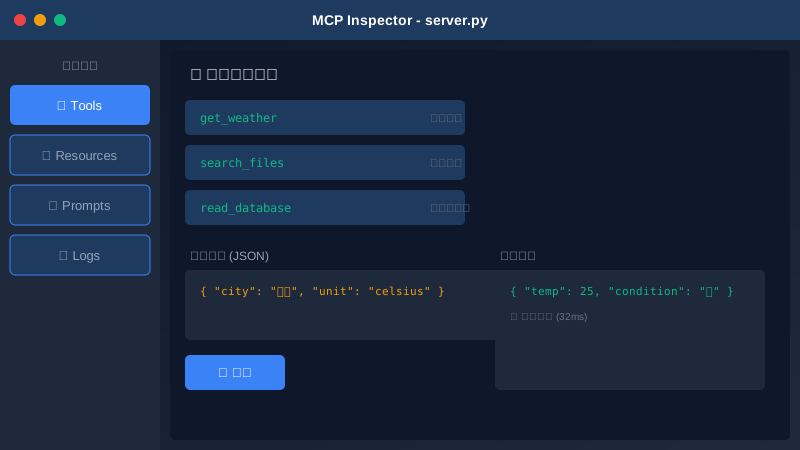
Inspector 界面提供以下功能:
| 功能模块 | 说明 |
|---|---|
| Tools | 测试工具调用,查看参数和返回值 |
| Resources | 浏览资源列表,读取资源内容 |
| Prompts | 预览提示词模板,测试参数化 |
| Logs | 查看服务器日志和调试信息 |
5.2 Claude Desktop 集成测试
在本地测试通过后,可以集成到 Claude Desktop 进行真实场景测试:
方式一:使用 mcp install 命令(推荐)
# 自动安装到 Claude Desktop 配置
uv run mcp install server.py

# 指定服务器名称
uv run mcp install server.py --name "my-calculator"

# 添加环境变量
uv run mcp install server.py --env-api-key ANTHROPIC_API_KEY
方式二:手动配置
编辑 Claude Desktop 配置文件:
- macOS:
~/Library/Application Support/Claude/claude_desktop_config.json - Windows:
%APPDATA%\Claude\claude_desktop_config.json
{
  "mcpServers": {
    "my-calculator": {
      "command": "uv",
      "args": [
        "--directory",
        "/path/to/my-mcp-server",
        "run",
        "server.py"
      ]
    }
  }
}
配置完成后,重启 Claude Desktop,在对话中即可使用新添加的工具。
5.3 常见问题排查
| 问题 | 可能原因 | 解决方案 |
|---|---|---|
| 服务器无法启动 | 依赖未安装 | 运行 uv sync |
| 工具调用失败 | 参数类型错误 | 检查类型注解 |
| Claude 找不到工具 | 配置路径错误 | 使用绝对路径 |
| 中文乱码 | 编码问题 | 确保文件使用 UTF-8 |
六、生命周期与进阶功能
6.1 服务器生命周期管理
当服务器需要在启动时初始化资源(如数据库连接),关闭时清理资源时,可以使用 lifespan 机制:
from contextlib import asynccontextmanager
from mcp.server.fastmcp import FastMCP, Context

@asynccontextmanager
async def app_lifespan(server):
    """管理服务器生命周期"""
    # 启动时:初始化资源
    print("正在初始化数据库连接...")
    db_connection = await connect_database()

    yield {"db": db_connection}  # 传递给请求处理

    # 关闭时:清理资源
    print("正在关闭数据库连接...")
    await db_connection.close()

mcp = FastMCP("my-server", lifespan=app_lifespan)

# 在工具中访问初始化的资源
@mcp.tool()
async def query_data(ctx: Context, sql: str) -> str:
    """Execute a SQL query."""
    db = ctx.request_context.lifespan_context["db"]
    result = await db.execute(sql)
    return str(result)
6.2 进度报告和日志
长时间运行的工具可以通过 Context 对象报告进度和日志:
@mcp.tool()
async def long_task(ctx: Context, items: int) -> str:
    """Process many items with progress updates."""
    results = []

    for i in range(items):
        # 处理项目
        result = await process_item(i)
        results.append(result)

        # 报告进度(当前/总数)
        await ctx.report_progress(i + 1, items)

        # 发送日志消息
        ctx.info(f"已处理 {i + 1}/{items} 个项目")

    return f"完成,共处理 {len(results)} 个项目"
6.3 传输协议选择
FastMCP 支持多种传输协议:
# stdio - 本地进程通信(默认)
mcp.run()

# SSE - Server-Sent Events
mcp.run(transport="sse")

# Streamable HTTP - 推荐用于生产环境
mcp.run(transport="streamable-http")

# 自定义端口
mcp.run(transport="streamable-http", port=8080)
传输协议对比:
| 协议 | 适用场景 | 特点 |
|---|---|---|
| stdio | 本地开发、Claude Desktop | 最简单,进程间通信 |
| SSE | 远程访问、Web 集成 | 服务器推送事件 |
| Streamable HTTP | 生产部署、高并发 | 推荐的无状态模式 |
七、发布与分享
7.1 项目打包
完善 pyproject.toml 配置:
[project]
name = "my-mcp-server"
version = "0.1.0"
description = "A custom MCP server for ..."
readme = "README.md"
requires-python = ">=3.10"
dependencies = [
    "mcp[cli]>=1.0.0",
]

[project.scripts]
my-mcp-server = "my_mcp_server:main"

[build-system]
requires = ["hatchling"]
build-backend = "hatchling.build"
7.2 发布到 PyPI
# 构建
uv build

# 发布到 PyPI
uv publish
发布后,其他用户可以这样使用:
{
  "mcpServers": {
    "my-server": {
      "command": "uvx",
      "args": ["my-mcp-server"]
    }
  }
}
7.3 贡献到社区
如果你开发了有用的 MCP 服务器,可以:
- 开源到 GitHub:添加详细的 README 和示例
- 提交到 awesome-mcp-servers:github.com/punkpeye/awesome-mcp-servers
- 参考官方服务器:学习最佳实践 github.com/modelcontextprotocol/servers
小结
- 环境搭建:使用 uv 包管理器和
mcp[cli]依赖快速启动项目 - FastMCP 核心:通过装饰器
@mcp.tool()、@mcp.resource()、@mcp.prompt()定义三大能力 - 工具开发:类型注解自动生成 Schema,支持 Pydantic 验证和结构化输出
- 资源暴露:通过 URI 模板暴露动态数据,支持文本和二进制内容
- 提示词模板:标准化工作流,支持参数化和多轮对话
- 测试调试:MCP Inspector 可视化测试,Claude Desktop 真实场景验证
- 进阶功能:lifespan 管理资源生命周期,Context 报告进度和日志
- 发布分享:打包到 PyPI,贡献到开源社区
📥 想获取更多 OpenCode 资源?
扫码加入「大熊掌门AI编程会员群」:

进群即领:
- 📄 Claude Code 入门指南 PDF(群内领)
专栏更新中,后续解锁:
- 📁 OpenCode 完整配置模板库
- 📝 5个常用自定义命令模板
- 📋 AGENTS.md 规则模板
- 📖 本专栏完整版 PDF 电子书(约20篇文章整合)
群内还有:
- 每周技术干货分享
- 问题答疑
- 付费内容专属优惠