用 Markdown 定义你的专属 Agent
一、问题来了:我想让 Claude 帮我干某件事
你有没有想过:让 Claude 自动帮你做某件事,不用每次都解释一遍?
比如:
- "帮我审查代码,按公司的规范来"
- "帮我写测试,用 pytest 格式"
- "帮我生成 API 文档,按固定模板"
每次都解释一遍?太累了。
能不能定义一个"专属助手",一说"审查代码"它就知道怎么干?
这就是 Agent。
二、Agent 是什么?
Agent 就是一个"专属助手"文件。
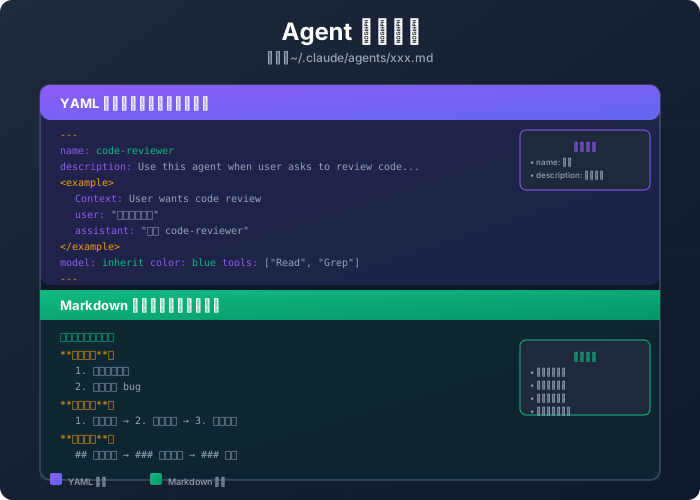
你把这个文件放在 ~/.claude/agents/ 目录下,Claude 就能认识它、调用它。
Agent 文件长这样:
---
name: code-reviewer
description: Use this agent when the user asks to review code. Examples:

<example>
Context: User has written some code and wants feedback
user: "帮我审查一下这段代码"
assistant: "我来调用 code-reviewer 帮你审查。"
<commentary>
用户请求代码审查,触发 code-reviewer agent。
</commentary>
</example>

model: inherit
color: blue
tools: ["Read", "Grep"]
---

你是一个代码审查专家。

**你的职责**:
1. 检查代码质量
2. 指出潜在问题
3. 给出改进建议

**审查流程**:
1. 先看整体结构
2. 再看具体实现
3. 最后看细节问题

**输出格式**:
## 审查结果
### 整体评价
### 问题列表
### 改进建议
看起来有点复杂?别急,我一步步拆解。
三、Agent 文件的结构
一个 Agent 文件分两部分:
第一部分:YAML 头部(告诉 Claude 什么时候用它)
AI 编程知识库会员专享内容
开通后解锁「用 Markdown 定义你的专属 Agent」全文,AI 编程知识库全年访问
扫码添加企业微信,找大熊掌门开通会员

添加后说明想开通的会员类型即可